Decision guide
Pre-Trade Risk Checks Without Adding Latency
How to add pre-trade risk checks to an order routing flow: which checks belong inline, which can run later, and how to test the delay they add.
Direct answer
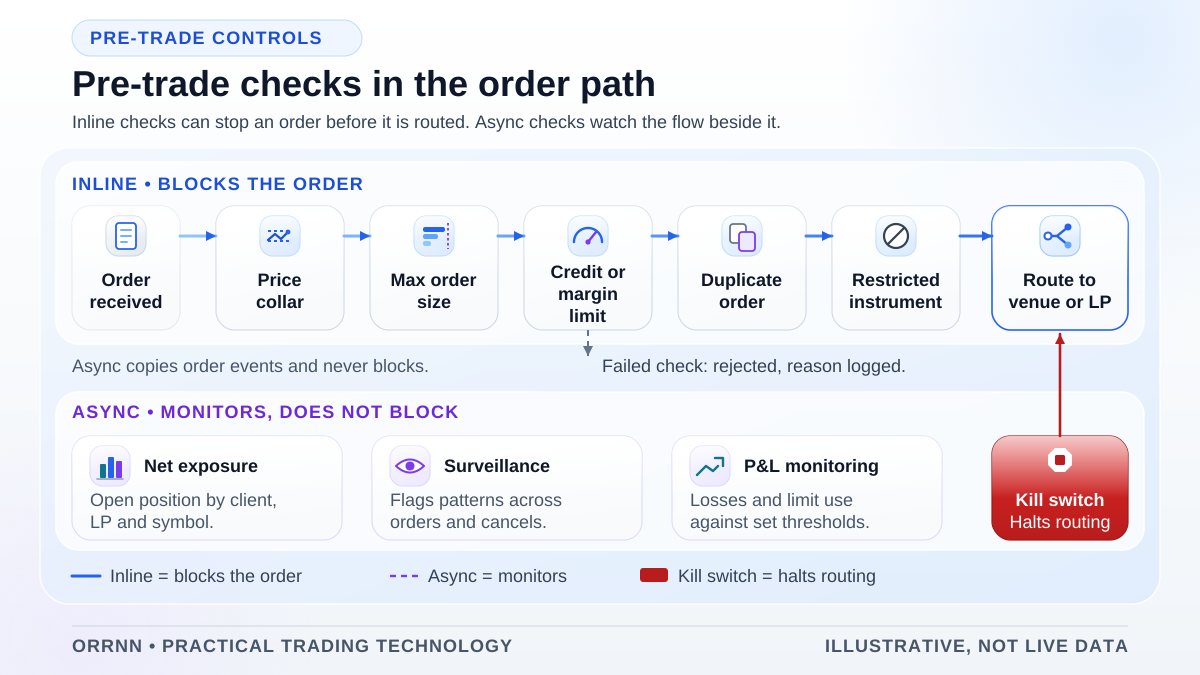
Pre-trade risk checks are controls that test an order against limits, permissions and sanity rules before it leaves the broker's system. Place the fast checks inline, between order validation and the router, using data already held in memory. Move checks that need large datasets or slow calculations to asynchronous processes that set limits and trigger kill switches.
Key takeaways
- A pre-trade check must finish before the order reaches a liquidity provider or venue, so its place in the flow is a control decision.
- Inline checks can block an order. Asynchronous checks monitor and act through limits or kill switches.
- Keep the data an inline check reads in memory and update it by event, so the order path never waits on a database query.
- Choose fail-closed or fail-open for each check in advance, and test stale and missing data.
- Measure the time each check adds on the build you run. This guide gives no latency figures for Orrnn or RTX5.
Why pre-trade checks are required
A risk report cannot recall an order that has already reached the market, so pre-trade checks stop breaches before submission. In the United States, SEC Rule 15c3-5 applies to broker-dealers that provide market access. It requires controls that block orders exceeding preset credit or capital thresholds, and orders that appear erroneous. It also requires checks for regulatory conditions and restricted securities.
The SEC's staff FAQ adds that these controls generally sit under the direct and exclusive control of the broker-dealer, and that a senior officer attests each year that they comply. Many retail FX and CFD brokers are not broker-dealers, so confirm which regime applies before you copy the design.
In the EU, MiFID II Article 17 requires firms trading algorithmically to maintain risk controls, including appropriate trading thresholds and limits, and to stop erroneous orders. Article 15 of Commission Delegated Regulation (EU) 2017/589, known as RTS 6, lists the pre-trade controls on order entry, including price collars and maximum order values and volumes. Check the current official text before setting thresholds.
Pre-trade risk checks: what runs inline and what runs later
For each check, ask whether the decision depends on this order alone and whether its data fits in memory and stays current. If both answers are yes, run it inline. If it needs a large dataset or a cross-account view, run it asynchronously and let it act through a hold, a limit change or a kill switch. The table is an example, not a product specification.
Example check placement for an FX or CFD routing flow (illustrative)
| Check | Inline or asynchronous | Data it needs | How to keep it fast | Failure behaviour |
|---|---|---|---|---|
| Order size and quantity | Inline | Order fields and an instrument limit table | Compare against a limit held in memory | Reject with reason code (fail-closed) |
| Price collar | Inline | Reference price and band width per instrument | Reference updated by the market data handler; band precomputed | Reject when the reference is missing or stale |
| Account credit or margin budget | Inline budget, asynchronous recalculation | Precomputed free budget per account | Reserve against the last recalculated budget | Reject when the budget is exhausted or unknown |
| Order and message rate | Inline | Counter per account and instrument | Single-writer counter owned by the gateway | Reject or queue to the configured limit |
| Permissions and restricted instruments | Inline | Versioned permission set per account | Loaded into memory, updated by event | Reject when the set is older than policy allows |
| Aggregate exposure across desks | Asynchronous, with an inline cap | Positions and fills from every system | Inline cap is a pre-allocated share | Breach raises an alert and a limit change |
Design patterns that keep inline checks fast
Keep decision data in memory. An inline check should read values the process already holds. A database call, a remote service call or a shared lock in the order path adds waiting that is hard to bound under load.
Precompute what you can. A budget calculated when account state changes lets the order path perform one comparison. The cost is slack, because a conservative budget can refuse orders that true exposure would allow. State how much slack is acceptable.
Use simple counters. A rate or open-order counter owned by one thread or process needs no lock. Lock-free structures reduce contention but are easy to get wrong, so adopt them only after a measured problem.
Co-locate checks with the gateway. Running inline checks in the same process or host removes a network hop. Co-location must not make the checks depend on routing logic, so a routing fault cannot skip them.
Fail-closed or fail-open for each check
Each check needs a stated behavior for three cases: it passes the order, it rejects it, or it cannot decide because its data is missing, stale or late. Fail-closed rejects or holds an undecidable order. Fail-open lets it proceed. For limits and permissions, fail-closed is usually the right default, because an unchecked order can create exposure nobody approved.
- Name the owner and the approver for each failure behavior.
- Treat stale data as missing data, with a maximum age set in policy.
- Set a timeout for each inline check, and return the failure behavior when it expires.
- Test each check with its data missing, not only present.
Steps to add a check to an existing routing flow
1. Write the control objective: the rule, the orders it covers and the authority that set the limit.
2. Classify the check as inline or asynchronous, and record the reason.
3. Name the data source, its owner, its update path and its maximum acceptable age.
4. Choose the failure behavior and timeout, and document both.
5. Place the check between validation and the router, ahead of every path that can reach a venue or liquidity provider, including fallback routes and manual tickets.
6. Implement against in-memory state, return a reason code for each rejection, and log the limit version used.
7. Run the replay, load and failure tests on the target build, and record the time added at named points.
8. Where the design allows, run the check in shadow mode before it blocks orders.
9. Add the check to monitoring and the kill-switch runbook, with an owner and a review date.
Testing checks: replay, load and failure tests
Test the check as a control, not only as code. Replay recorded or scripted order sequences through the check and router on the target build. Include orders at each limit boundary, one unit over a limit, cancel and replace sequences, and orders that arrive during a reference price update. Write the expected decision before each run.
Run load tests at the expected message rate plus an agreed margin. Report percentiles for the time between named points, not an average, and keep one clock source for every measurement. A developer workstation does not show the production path.
Run failure tests on purpose: remove the reference price feed, delay a permission update, restart the counter service, drop the gateway connection mid-decision, and submit an order while the budget store is unavailable. Confirm each case produces the documented behavior and a logged reject or hold.
Kill switches and monitoring
A kill switch stops order flow for an account, instrument, desk or the whole system. It must not depend on the component it stops. Give it a separate path, a named operator authority and a logged reason, and test it while the router is under load.
Monitor the checks themselves. Track rejects and holds by reason code, account group and instrument, and alert when the time an inline check adds moves beyond a threshold set during testing. A rise in rejects can mean a bad limit, a stale feed or a client breaching a permission, and each needs a different response.
Monitoring does not replace inline controls. An alert after an order is sent is evidence, but it cannot stop that order.
Frequently asked questions
Do pre-trade risk checks always add latency?
Any check that waits for data or a decision adds some time. A check that compares an order with values already in memory adds far less than a network round trip, but the real amount depends on the implementation and build. Measure it at named points on the configuration you plan to run. Do not accept a speed figure from a vendor or a guide, including this one, without your own test.
Where should a pre-trade check sit in an order routing flow?
Put inline checks after order validation and before the router, and before any path that can reach a venue or liquidity provider. That includes fallback routes and manual tickets. The check should be independent of routing logic, so a routing change cannot skip it. Asynchronous checks run beside the flow and act through limits, holds or kill switches.
What is the difference between fail-open and fail-closed?
Fail-closed means an order that a check cannot decide is rejected or held. Fail-open means it proceeds. For limits and permissions, fail-closed is usually the safer default, because an unchecked order can create exposure that no one approved. Write the failure behavior for each check, with an owner and an approver.
Does SEC Rule 15c3-5 apply to retail FX and CFD brokers?
Rule 15c3-5 applies to broker-dealers that provide market access. Many retail FX and CFD brokers are not broker-dealers, so the rule may not apply to them directly. Other regimes can still set expectations for controls. Confirm the applicable regime with qualified counsel before you design the checks.
Does RTX5 include pre-trade risk checks?
This guide does not state that RTX5 includes a pre-trade risk check module. The RTX5 liquidity bridge and FIX modules have no published build (RTX5 roadmap, checked 9 November 2026). Orrnn's engineering work can evaluate pre-trade requirements and design where checks sit. A proposal should name the checks, build and acceptance tests it includes.
Primary sources and further reading
These sources support the frameworks and definitions used in this guide. They do not endorse Orrnn or establish that any product complies with the referenced material.
- Small Entity Compliance Guide: Rule 15c3-5
U.S. Securities and Exchange Commission
Pre-trade controls for broker-dealers with market access: credit and capital limits, erroneous orders and restricted securities.
- Frequently asked questions on the market access rule
U.S. Securities and Exchange Commission, Division of Trading and Markets
Staff answers on direct and exclusive control of risk controls and annual certification. Dated April 2014.
- Article 17: Algorithmic trading
European Securities and Markets Authority
MiFID II requirements for algorithmic trading systems, risk controls, and thresholds and limits.
- MiFID II, Interactive Single Rulebook
European Securities and Markets Authority
Entry point to the MiFID II framework and its linked articles.
- Commission Delegated Regulation (EU) 2017/589 (RTS 6)
EUR-Lex, Publications Office of the European Union
Article 15 lists the pre-trade controls on order entry, including price collars and maximum order values and volumes. In force when checked on 9 November 2026.
Related reading
Order routing for FX and CFD brokers
The routing rules, risk gate and audit trail that surround these checks.
Read →Core engine architecture
How Orrnn approaches order lifecycle and engine design, with availability labels.
Read →Measure latency to a broker server
Timestamp points and measurement methods for testing the time a check adds.
Read →